Loading…
Audio to Ocarina MIDI
Turn pure, resonant clay and ceramic ocarina melodies into editable MIDI. Upload an MP3, WAV, M4A, or FLAC, keep ocarina selected so acoustic guitars, harp arpeggios, and orchestral pads stay masked out, review every note on the piano roll, and drop the .mid into your DAW.
Hear the clay vessel tone, see the ocarina MIDI on the roll
Play your recording beside the piano roll. Because an ocarina acts as a closed Helmholtz resonator with almost zero upper harmonics, its pure sine-like notes map onto the piano roll with crystal clarity.
Reading the MIDI…
Ocarina MIDI tuned for closed-chamber vessel flutes
Ocarina-only hard mask away from folk guitars and orchestral accompaniment
Starting from this page locks the hard mask onto the ocarina voice. Plucked acoustic guitars, celtic harp rolls, and lush soundtrack strings are ignored so only the vessel-flute melody writes to your MIDI clip.
Captures pure sine-like Helmholtz resonance and acute breath-pressure curves
Unlike cylindrical tubes that overblow into octave harmonics, an ocarina produces an almost pure fundamental tone where pitch climbs steadily with breath pressure from low A4 up to high F6. The transcription tracks crisp fingered grace cuts and stable phrase endings without octave confusion.
Unquantized .mid ready for fantasy game scoring & woodwind layering
History gives you the unquantized transcription MIDI first so gentle rubato and expressive breath swells stay human. Drop the .mid into Logic, Cubase, Ableton, or FL Studio to drive an ocarina library or layer orchestral winds over a home recording.
Distinct from concert flute, recorder, and tin whistle
Open-tube flutes, recorders, and pennywhistles rely on rich overtone stacks and second-octave overblowing, whereas an ocarina has a hollow, closed-chamber acoustic profile within a compact 1.5-octave or multi-chamber range. Use this page whenever the source is a vessel flute.
How to turn an ocarina recording into MIDI
Four simple steps from a solo ceramic flute recording or game soundtrack to an editable .mid.
- 1
Upload up to 10 minutes of ocarina audio
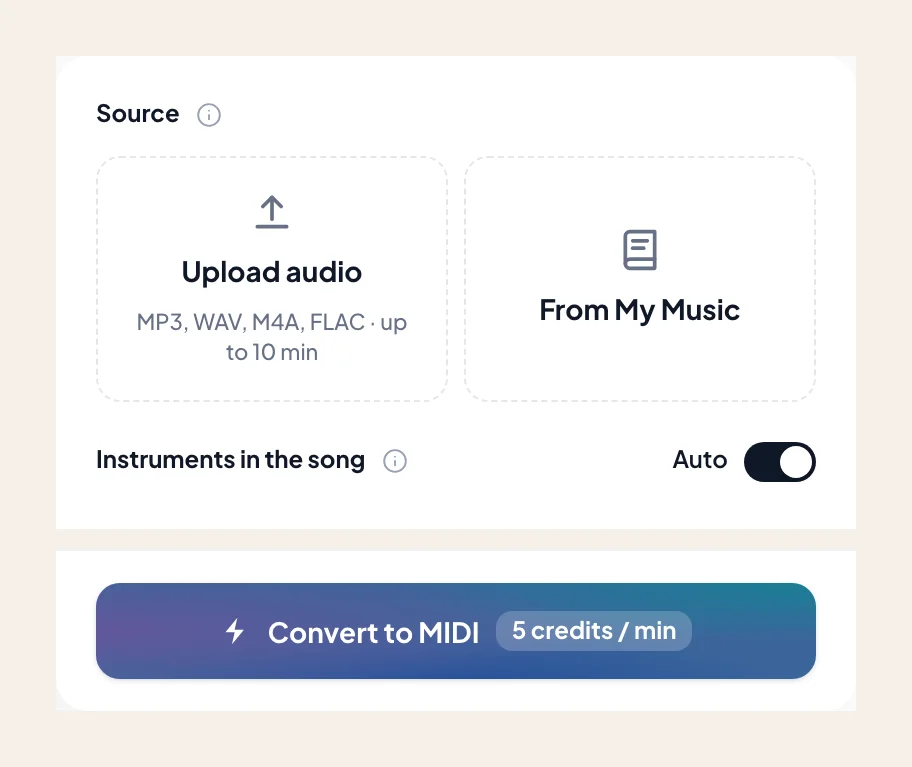
Choose an MP3, WAV, M4A, or FLAC — a 12-hole Alto C solo, a multi-chamber triple ocarina arrangement, or a nostalgic RPG town theme. Or pick a track from My Music.
- 2
Keep ocarina preselected
Ocarina is preselected by default here. Leave it isolated so accompaniment chords or ambient sound effects stay out of your lead MIDI track.
- 3
Verify high-note pitch centers on the piano roll
Scrub the roll against the audio, especially on top-end notes (D6–F6) where players blow harder, to confirm every note sits on the intended scale degree.
- 4
Download .mid and arrange in your DAW
Import the .mid into your DAW to build full orchestral backing around your melody, swap patches, or re-time phrases.
Ocarina MIDI exports for game composers and folk creators
Download the verified .mid directly into your DAW. If you want printable staff notation instead of finger-chart tabs, visit the Audio to Sheet Music ocarina page.
- 01
Unquantized Transcription MIDI (.mid)
Captures the natural phrasing, fingered grace-note taps, and lyrical rubato of a live 6-hole, 12-hole, or triple ocarina performance.
- 02
Ready for Ableton, Logic, FL Studio & Game Audio Engines
Import into any DAW or middleware workflow to orchestrate harmonies, double with celesta or harp, or trigger custom soundfonts.
Tips for spotless ocarina MIDI transcription
Ocarinas have one of the purest waveforms in the wind family, but breath pressure and room echo still matter.
Watch for flat low notes or sharp high notes on informal takes
Because an ocarina's pitch shifts up to a semitone depending on how hard the player blows (the breath-curve requirement), casual performers sometimes blow sharp on high E6/F6. Check those peaks on the piano roll before exporting.
Tame bathroom or living-room reverb on solo recordings
Ocarina players love recording in tiled rooms for natural echo, but long tails can make fast sixteenth-note runs blur together. Run Dereverb first if the room decay masks fast finger transitions.
Works across Sopranino, Alto C, Bass, and Triple ocarinas
Whether your audio is a piercing Soprano G ocarina or a deep Contrabass C vessel, the model writes exact concert pitches without needing to know the instrument's finger system.
Game soundtrack producers and folk players using ocarina MIDI
“I compose my fantasy RPG melodies by improvising on a ceramic 12-hole Alto C ocarina at my desk. Dropping the voice memo here gives me an instant MIDI track to orchestrate around in Cubase.”
“Because an ocarina has almost a pure sine-wave tone, it's super easy to hear on the piano roll—and the hard mask completely ignored the strummed acoustic guitar behind my melody.”
“We transcribed a four-part ocarina quartet arrangement by running the chamber recording through and splitting the voices in Logic. Even the fast triple-chamber register crossovers came out clean.”
More vessel flutes, folk winds, and woodwinds as MIDI
Explore sibling folk flutes and woodwinds — each page opens Audio to MIDI with that voice preselected.
Flute
Convert a song or MP3 to flute MIDI online. Capture an exposed flute line as a .mid — keep flute selected, then rewrite phrasing in your DAW.
Clarinet
Convert a song or MP3 to clarinet MIDI online. Capture a clarinet solo line as a .mid — keep clarinet selected, then rewrite in your DAW.
Soprano & alto sax
Convert a song or MP3 to alto or soprano sax MIDI online. Capture the sax melody as a .mid — keep alto / soprano sax selected, then rewrite in your DAW.
Frequently asked questions
Does Audio to Ocarina MIDI give accurate results?
How do I use Audio to Ocarina MIDI?
Why does ocarina transcribe differently than a regular flute or whistle?
Does it support 4-hole/6-hole pendant ocarinas as well as 12-hole transverse and triple ocarinas?
What happens if the player's breath pressure drifted slightly flat or sharp?
Will background harp or guitar chords leak into the ocarina MIDI?
Can I get printable ocarina sheet music instead of a .mid file?
Can I try Audio to Ocarina MIDI for free?
What do I get after conversion?
Can I open the result in my music software?
Can I use the result in my own projects and commercially?
What files can I upload?
How do I get the best result from Audio to Ocarina MIDI?
Convert your ocarina recording into editable MIDI
Upload your vessel-flute track, keep ocarina selected, and download a clean .mid for your DAW.